Every feature in Stack Toast.
Stack Toast is a Laravel 13 SaaS starter kit. This is the complete list of what is already built when you install it, in the Livewire, React, Vue and API editions alike.
- Payment processors 4
- Dashboard metrics 22
- Admin areas 11
- Automated tests 1,684
- Licence One payment, unlimited projects
Billing and subscriptions
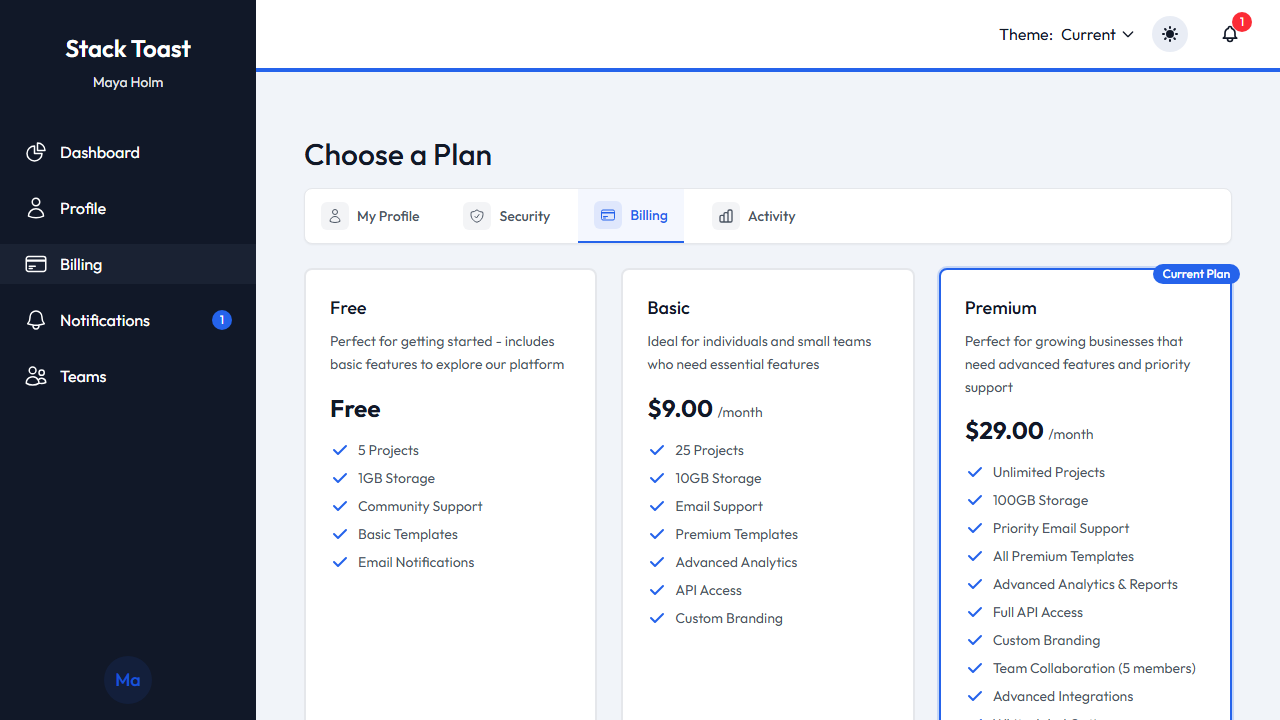
Four payment processors behind one interface, with the plans, trials, coupons and invoices a subscription business needs.
- Four payment processors
- Stripe, Paddle, Lemon Squeezy and Coinbase Commerce are interchangeable. Pick one, or run several side by side.
- Subscriptions and one-time payments
- Sell recurring plans, single purchases or both from the same plan system.
- Trials
- Give any plan a trial period. The move from trial to paid is handled for you.
- Multi-currency payments
- Each plan carries its own currency, and reports keep currencies apart.
- Coupons
- Percentage and fixed discounts. Full support on Stripe and Paddle, limited on Lemon Squeezy, and applied on the server where a processor has no discount API.
- Server-computed amounts
- The final amount, the price and the discount are always worked out on the server. A total sent by the browser is never trusted.
- Scheduled plan changes
- Upgrade or downgrade now or on a chosen date, on the processors that support it.
- Invoice PDFs
- Customers download their invoices from the billing page. Admins can download them from the panel.
- VAT number capture
- A customer’s VAT number is collected and stored with the processor where it can hold one.
- Cancellation grace periods
- A cancelled subscription keeps its access through the grace period instead of ending on the spot.
- Unfinished checkout recovery
- A checkout that was abandoned or interrupted is checked against the processor, so the account ends up in the right state.
- 3D Secure
- A payment that needs extra authentication is resumed after the customer confirms it.
- Verified webhooks
- Webhook signatures are checked, and every processed event is recorded so a repeated delivery is ignored.
- Your own processor
- Implement one interface and register it. The admin settings pick it up without further changes.
Payment capabilities vary by processor. Coinbase Commerce handles one-time crypto payments and has no discount or seat-proration API.
Accounts and authentication
Every common way to sign in, two-factor authentication and the account pages your users expect.
- Email and password
- Registration with email confirmation, sign-in and password reset.
- Magic links
- Passwordless sign-in through a link sent by email.
- Email PIN
- Sign-in with a short code sent by email.
- Social login
- Google, GitHub, Facebook and X through Laravel Socialite.
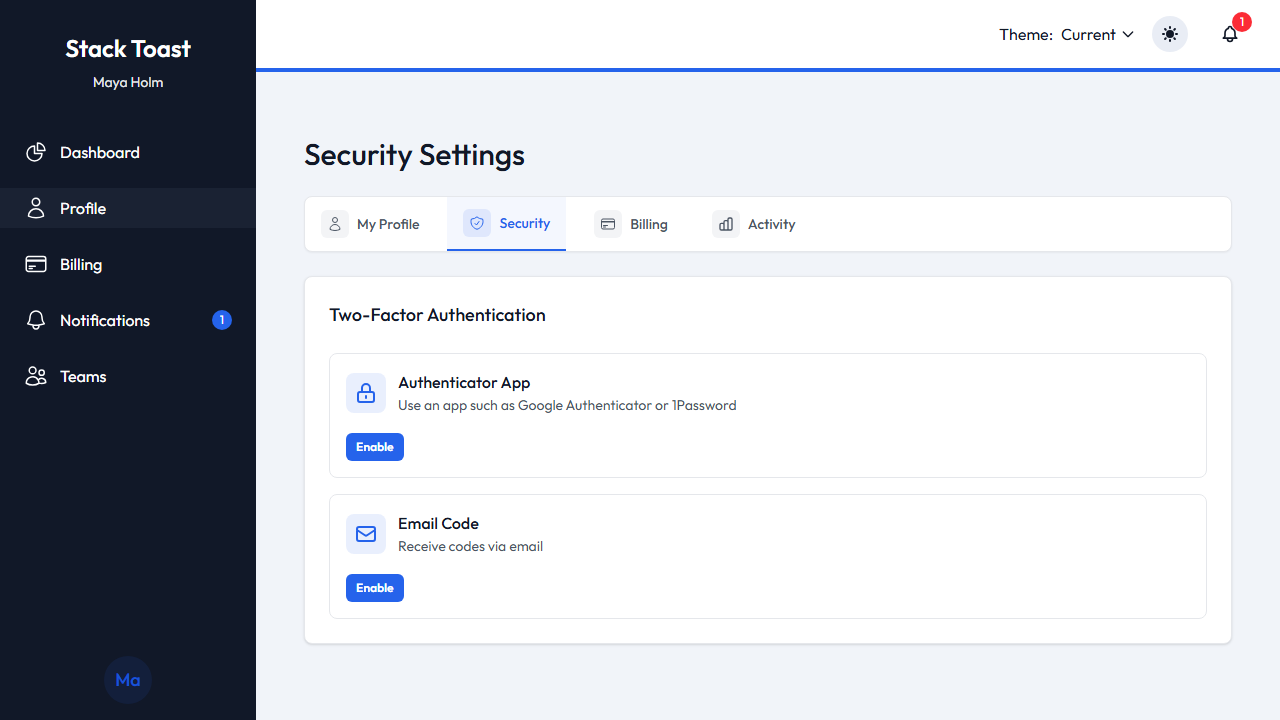
- Two-factor authentication
- Authenticator app codes, with SMS through Twilio and email as further options.
- Recovery codes
- One-time backup codes for a lost device, stored hashed.
- Profile and avatar
- Users manage their own name, email, password and picture.
- Roles and permissions
- Role and permission checks are available as route middleware and are managed from the admin panel.
- API tokens
- Laravel Sanctum tokens with scoped abilities and a configurable expiry.
- Activity log
- Each user sees a history of sign-ins and account changes. Admins see the same record.
- In-app notifications
- A notification feed inside the app, with one call to add your own messages.
- Themes
- Several built-in colour themes and a switcher in the app.
- Waiting list
- Collect sign-ups before launch, stored in your database or sent to Mailchimp, Mailgun or SendGrid.
Teams and access
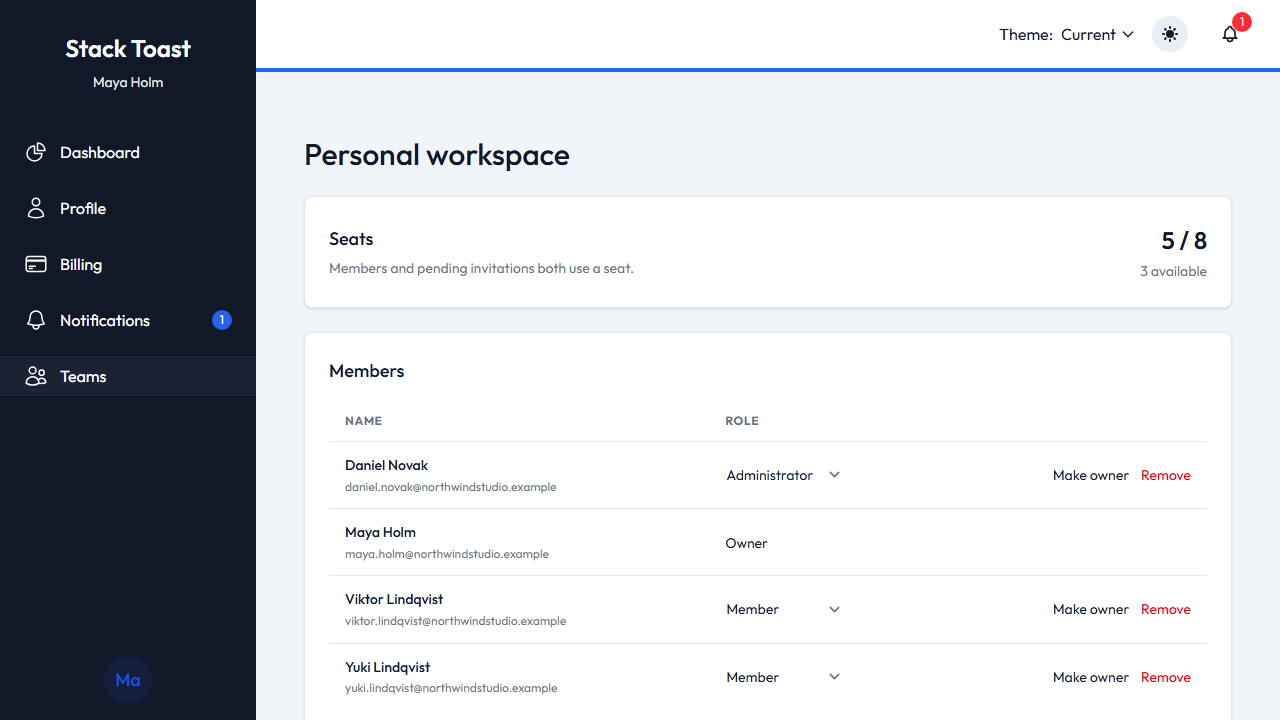
Sell to companies as well as individuals: one subscription, several members, and seats that are counted and enforced.
- Team billing
- A team holds the subscription, and its members share the plan.
- Invitations
- Invite members by email. Pending invitations are listed and can be withdrawn.
- Team roles
- Each member has a role inside the team, changed from the members list.
- Seat limits
- An invitation is refused once the plan’s seats are used up.
- Seat usage
- Owners see how many seats are taken and how many remain.
- Ownership transfer
- Hand a team to another member without recreating it.
- Seat proration
- A change in seats is prorated on the processors that support it.
- Optional
- Building a product for individuals? Turn teams off in configuration.
Revenue and analytics
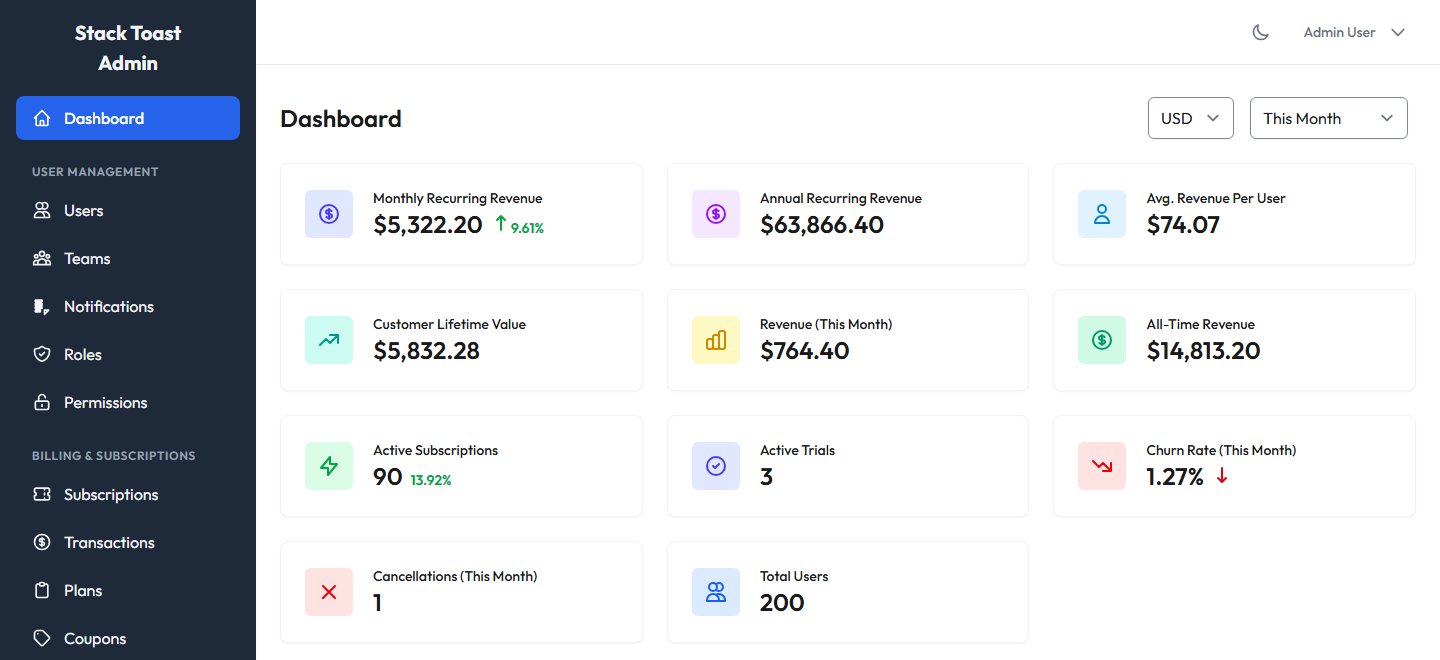
A revenue dashboard with 22 metrics, computed from your own payment records.
- MRR and ARR
- Monthly and annual recurring revenue.
- ARPU and lifetime value
- Average revenue per user and what a customer is worth over time.
- Churn and cancellations
- How many customers leave, with the reasons they gave.
- Active subscriptions and trials
- Current counts, and how trials are converting.
- Revenue trends
- Revenue over time with period-to-period comparison.
- Before and after discounts
- Gross revenue next to what was actually collected.
- Coupon attribution
- Which coupons were used, and which ones brought in the most.
- Crypto and refunds
- Crypto payments and refunds are reported separately.
- Date filters
- Every metric can be narrowed to a date range.
- Multi-currency reporting
- Figures are reported per currency, never added across them.
Admin panel and customer support
A complete back office in every edition, including the API one. It is server-rendered and separate from your app’s frontend.
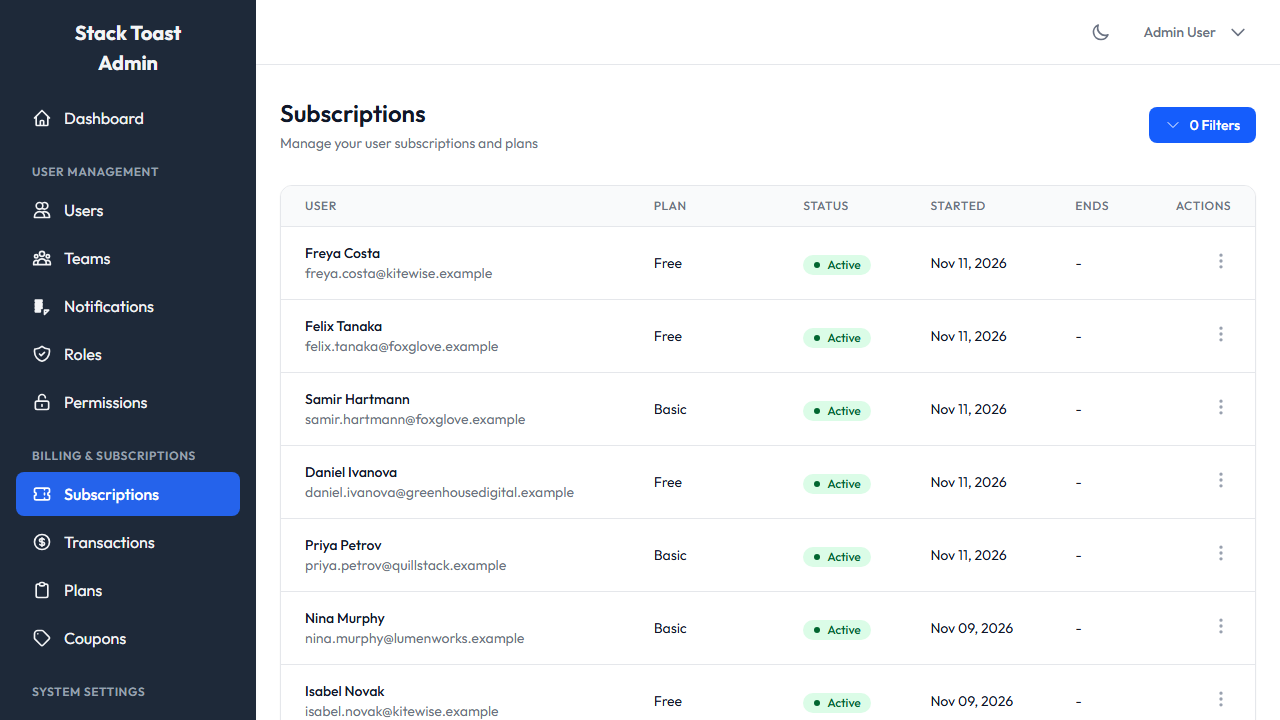
- 11 admin areas
- Dashboard, users, teams, plans, subscriptions, transactions, coupons, roles, permissions, payment processors and the waiting list.
- User management
- Create, edit and deactivate users.
- Plans and subscriptions
- Create plans, set prices and trials, and manage any customer’s subscription.
- Transactions
- A searchable payment history, with invoice downloads.
- Team support
- See a team’s members, roles and pending invitations.
- Impersonation
- Sign in as a user to see what they see. Sessions are time-limited.
- Protected actions
- An impersonated session cannot make the changes you mark as off-limits.
- Activity logs
- A user’s recent activity, next to their account.
- Cancellation feedback
- Read why customers cancelled.
- Your own admin pages
- Add a sidebar entry with one call, and write the page in Blade, React or Vue.
Security
Protections that are on from the first deploy, configured through environment settings.
- Security headers
- A configurable Content Security Policy, HSTS and framing protection.
- Captcha
- reCAPTCHA, hCaptcha and Cloudflare Turnstile behind one setting.
- Rate limiting
- Named rate limits on sign-in, registration and the other sensitive routes.
- Session fingerprinting
- A session is tied to the browser that created it. It is not tied to the IP address, so mobile users are not signed out when their network changes.
- Social-login takeover defence
- A social account cannot be used to take over an existing account with the same email.
- TOTP replay protection
- An authenticator code is accepted once.
- Hashed recovery codes
- Two-factor recovery codes are stored hashed, like passwords.
- Cloudflare integration
- Visitor IP and country detection behind Cloudflare, and bot challenges.
Operations
The scheduled jobs, health checks and server configuration that keep a production app tidy.
- Health checks
- A check of your integrations and configuration, so a missing key is found before a customer finds it.
- Abandoned registration cleanup
- Unfinished sign-ups are removed on a schedule.
- Token and webhook pruning
- Expired API tokens and old webhook records are cleared automatically.
- Renewal reminders
- Crypto subscriptions cannot renew on their own, so customers are reminded before they lapse.
- User data exports
- A user requests an archive of everything held about them. It is built in a queue and delivered through an expiring signed link.
- Extendable exports
- Add your own tables to the export by extending one service.
- Deployment configuration
- Docker, nginx, PHP-FPM and queue worker configuration, with deployment guides.
Installer and setup
A public command-line installer creates the project, and a setup wizard takes it from a fresh clone to a running app.
- One-command install
composer global require stacktoast/installer, thenstacktoast new my-appfor every new project.- Machine check
stacktoast checkconfirms PHP, Composer, Node, git and, if you ask, your database connection. It runs before you buy.- Access check
stacktoast whoamishows which editions your GitHub account can install.- Pick the edition
- Choose Livewire, React, Vue or API when you create the project, or pass
--stack. - Ready for your repository
- A new project starts on its own
mainbranch, with Stack Toast connected as the release remote andoriginfree for your repository. - Pin a release
--taginstalls a specific version instead of the newest.- Setup wizard
- One interactive command installs dependencies, writes the environment file, migrates and seeds the database and builds the assets.
- Reconfigure one part
- Run the wizard again for a single step: payments, email, social login, security, the waiting list or AI keys.
- Unattended setup
- A non-interactive mode takes every answer from the environment, for CI.
- Docker option
- The wizard can use the bundled Docker services for the database, Redis and mail.
- Windows, macOS and Linux
- The installer and the wizard are written in PHP and run wherever PHP does.
Customisation and upgrades
Your app lives in your own repository and shares git history with Stack Toast, so a new release arrives as a merge you review first.
- Your own repository
- Your project is yours from the first commit, with Stack Toast connected as a second remote.
- Documented extension points
- Change shipped behaviour through subclasses, view overrides and settings, without editing shipped files.
- Upgrade report
php artisan stacktoast:upgradeshows what a release involves and changes nothing.- Trial merge
- The report lists the files that would conflict, found by a real merge that leaves your working tree alone.
- Merge on a branch
--mergebrings the release onto a dedicated upgrade branch. Your main branch is untouched until you decide.- Modified-file report
- Shipped files you have edited are listed, each with the supported way to make that change.
- Stale override detection
- If a view you overrode has since changed upstream, the report tells you.
- Missing settings
- New environment keys in a release are listed against your own
.env. - Rules for AI coding agents
- Instructions for Claude Code, Cursor and Codex ship with every edition, so an agent builds on the foundation instead of rewriting it.
- Architecture notes
- Documentation of where your code belongs, plus Laravel Boost guidance.
SEO and code quality
Sensible search defaults for an app, and the tests and checks that let you change code with confidence.
- Noindex by default
- App pages stay out of search engines unless you list them as indexable.
- Canonical URLs and social previews
- Canonical links and Open Graph metadata, set per page or site-wide.
- Sitemap
- A sitemap you extend from your own code, including pages that come from the database.
- Route-aware robots.txt
- Generated from the same list of indexable routes.
- Automated tests
- 1,684 backend and frontend tests ship with the code.
- Static analysis
- PHPStan through Larastan, with Pint for code style and Rector for upgrades.
- Cross-stack parity checks
- Browser tests confirm the Livewire, React and Vue editions behave the same.
- OpenAPI specification
- Generated from the API routes, ready for client generators and API tools.
Four stacks, one foundation
Everything above ships in every edition. The editions differ only in how the app’s own pages are built.
| Edition | App pages | Choose it when |
|---|---|---|
| Livewire | Blade, Alpine and Livewire | You want to build interactive screens in PHP. |
| React | React pages through Inertia | Your team writes its interface in React. |
| Vue | Vue pages through Inertia | Your team writes its interface in Vue. |
| API | Sanctum API and an OpenAPI specification | You are bringing a separate web or mobile frontend. |
Every edition includes the Sanctum API and the complete admin panel.
AI Cocktail, an optional add-on
Chain 20 AI providers into one feature.
AI Cocktail is a separate Laravel package for the AI features inside your product. It is included in the bundle and sold on its own for $149. Stack Toast works without it.
See what AI Cocktail does- 20 providers
- OpenAI, Anthropic, Google Gemini, Grok, DeepSeek, Perplexity, OpenRouter, Hugging Face, AIML API, Stability AI, ElevenLabs, Runway, HeyGen, RunPod, Tavily, Brave Search, Serper, Firecrawl, ScrapingBee and Apify.
- One interface
- Text, image, voice and video generation, search and scraping are called the same way whichever provider answers.
- Pipelines
- Chain steps across providers. Each step can use the results of the ones before it.
- Fallback providers
- Name an alternative for a step. If the first provider fails, the request is tried on the next.
- Token usage
- Usage is returned with each response, so you can meter or bill it.
- Your own keys
- You bring your provider API keys. Provider usage is billed by the provider.